Device Responsive Screen Vector: A Flexible Toolkit for Modern Design
Understanding the Asset Beyond the Name
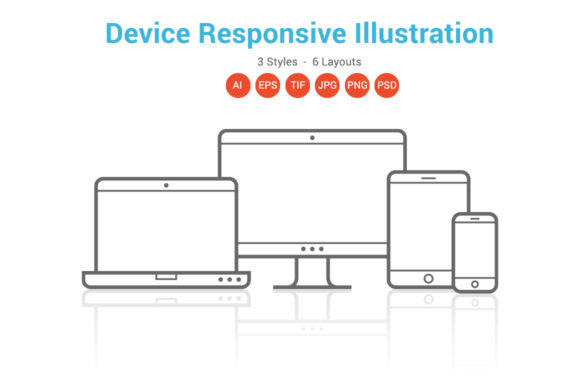
When you first encounter the Device Responsive Screen Vector, you might mistake it for a single illustration. In reality, it’s a comprehensive design asset built to solve a very specific, modern problem: how to showcase your digital work across a fragmented device landscape. This isn't just a static picture of a laptop; it's a dynamic toolkit designed to present your websites, apps, and marketing materials in a context that feels authentic and current. The "responsive" in its name is key—it signals adaptability, a core requirement for any brand or creator today.
Visually, this asset set is clean, contemporary, and deliberately understated. The screens are rendered with a professional neutrality, avoiding flashy gradients or dated bezels that would anchor your work to a specific tech era. Its personality is that of a reliable workhorse—it steps back so your content can step forward. The overall appeal lies in its versatility. It provides a credible frame for your designs without imposing its own strong stylistic opinion, making it suitable for everything from a sleek SaaS dashboard to a cozy artisan's online shop.
Where This Asset Truly Shines: Practical Applications
The true value of the Device Responsive Screen Vector is unlocked when you consider its breadth of application. For a Web Marketing Agency or Social Media Services provider, it's indispensable. Instead of generic stock photos, you can place your actual client work—a live website, a social media feed mockup—into these device frames for case studies and proposals. This instantly elevates your promotional materials from theoretical to tangible, building client trust through visual proof.
For entrepreneurs, bloggers, and small business owners creating their own web design or brand identity, this set is a game-changer for self-presentation. Use the PNG or PSD files to create stunning hero images for your homepage that show your site looking perfect on a phone, tablet, and desktop. It’s a powerful way to communicate professionalism and attention to detail before a visitor even reads a word. The included AI, EPS, and PSD files mean you have full control; you can change the background color to match your brand palette in seconds, ensuring perfect consistency.
Beyond digital, consider editorial design and packaging design. A tech magazine article about "Top Apps of the Year" gains immediate authority with device mockups showcasing the apps. A physical product's packaging or instruction manual can use these vectors to illustrate a companion mobile app download. The 1200 x 766 pixel and 16 x 10 inch dimensions provide ample resolution for both screen and high-quality print projects, making it a true cross-media design asset.
Integrating and Customizing with Precision
Working with the Device Responsive Screen Vector is straightforward, but a few practical considerations will maximize its impact. First, evaluate the six layouts. Do you need a single phone screen for a focused mobile app promotion? Or a multi-device composition to showcase a full responsive website redesign? Choose the layout that best tells your project's story. The three styles offer subtle variations in device angle and arrangement, allowing you to select the one with the best visual flow for your composition.
Customization is where your expertise as a designer or content creator takes over. Because the files include shape layers in Photoshop and vector paths in Illustrator, scaling is lossless. You can resize a screen for a tiny favicon mockup or a massive trade show banner without a hint of pixelation. The transparency in PNG and TIFF formats is crucial for seamless integration over complex backgrounds or within layered infographics.
A critical piece of advice: while the asset itself is highly customizable, your focus should remain on the content you place inside the screens. Ensure your website screenshots or app UI mockups are crisp, well-composed, and representative of your best work. A beautifully framed mediocre design is still mediocre. Pair this asset with strong typography for your accompanying text—a clean sans serif font often works well to maintain the modern, tech-forward feel—and use a limited color palette derived from your brand to tie everything together.
Finally, always check the included licensing for your intended use, especially for large-scale commercial projects. The Device Responsive Screen Vector is a powerful tool for enhancing visual hierarchy, building brand recognition, and boosting audience engagement by providing a familiar, professional context for your digital work. It’s not about decoration; it’s about credible presentation in a device-diverse world.